I wanted something that actually does the work. That search led me
Vmake. It is a platform that promises to handle the heavy lifting of video production. I decided to test their new AI Agent to see if it could actually produce usable UGC Videos without the usual headache.
The Dashboard and First Impressions
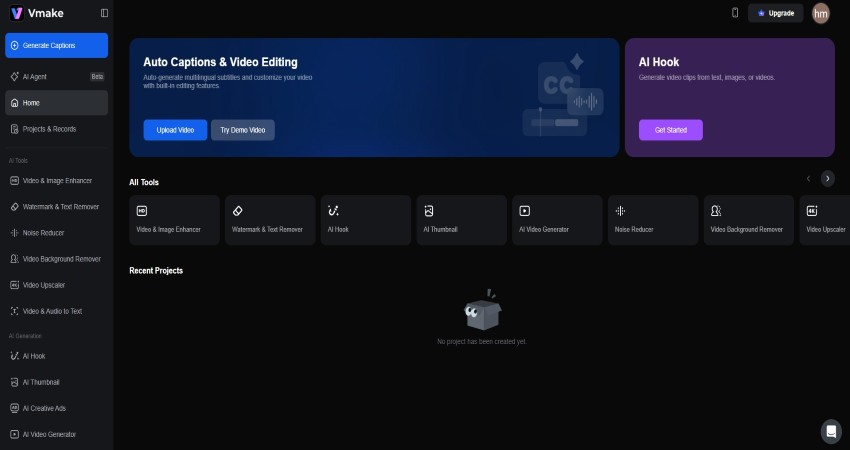
The first login punches you with a dark, minimal interface. No clutter, no timelines, just clean, simple categories. If you have a video with a distracting logo, you go to the "Video Watermark Remover". If you have grainy footage, you go to the "AI Video Enhancer."
Right there on the left, prominently displayed, is the "Vmake Agent." It is currently in beta. The description says it takes you from idea to publish-ready video.
Testing the AI Agent: From Prompt to Product
I decided to simulate a real-life scenario. I acted as a portable espresso maker dropshipping seller. This is a classic product that needs a specific type of video.
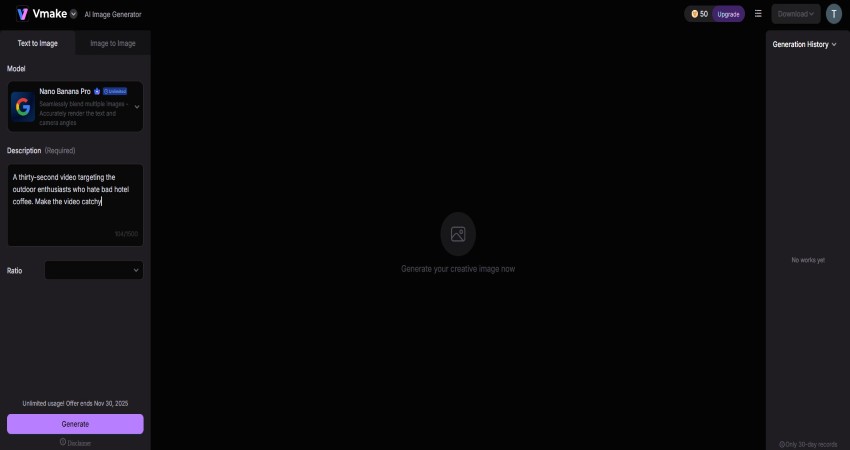
I opened the Agent and typed in my prompt. I asked for a thirty-second video and specified that the target audience was outdoor enthusiasts who hate bad hotel coffee.
Also, I wanted the video to be catchy, so I mentioned that as well.
Prompt: A thirty-second video targeting the outdoor enthusiasts who hate bad hotel coffee. Make the video catchy
The tool began processing. The script Vmake generated was surprisingly solid. It started with a hook. It asked a question about missing morning coffee while hiking. It was simple, but it worked. Next, the AI started assembling visuals. It pulled clips that matched the script lines.
The Quality of the Output
The resulting video was a piece of social media content. The pacing felt right for TikTok or Instagram Reels. However,
the voiceover was the biggest surprise. It sounded natural and didn't have that jarring or metallic twang that older text-to-speech engines have. It sounded like a narrator explaining a product, not a computer reading code. This is where the value lies. I created a usable video asset in about three minutes.
Why UGC Style Matters
The video generated by the agent leaned heavily into the style of UGC Videos. This stands for User Generated Content. This style is excellent and is viral all over social
media. The reason behind this is that it converts better than outdated ads. And it looks exactly like man-made.
Vmake seems to understand this. The stock footage it selects tends to look more lifestyle-oriented and less corporate. It uses clips of hands holding products or people using items in real environments.
This helps the viewer visualize themselves using the product.
Digging Deeper: The Editing Suite
While the Agent is the star of the show, the other tools on the dashboard are what make the platform sustainable for daily use. I spent some time exploring the "AI Video Editing" section.
There is a feature called "AI Hook." This caught my eye immediately. In the attention economy, the hook is everything. If you don't grab the viewer in the first two seconds, they scroll past. This tool is designed specifically to generate opening sequences that stop the scroll.
Then there is the "Auto Captions & Video Editing" tool. We all know that a huge percentage of social media consumption happens with the sound off. If your video doesn't have captions, you are invisible to people on the bus or in the office.
The Clean-Up Tools: Salvaging Bad Footage
Sometimes your footage is almost perfect, except for that one problem, like an unlicensed logo or a timestamp stuck in the corner. Vmake offers a "Video Watermark Remover" and a "Video Text Remover." I tested the text remover on a clip that had some old subtitles burned into the video file. It cleaned the text out so well that I had a fresh, usable shot ready for new captions. You can take an old video, scrub the old, outdated text, and overlay new, relevant information.
Enhancing Quality for Professional Results
Another common issue creators face is low-quality source material. Maybe you are using a clip sent by a customer.
Maybe you are using older footage from a previous campaign. Low resolution kills trust. If a video looks pixelated, the customer assumes the product is cheap.
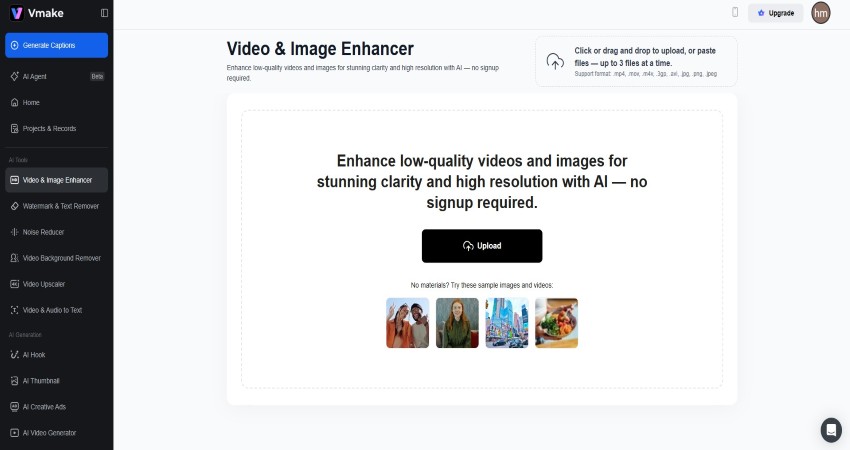
The "AI Video Enhancer" and "Video Upscaler" features address this. I took a blurry 480p clip and ran it through the enhancer. The difference was noticeable. The edges became sharper. The visual noise in the shadows was reduced.
Who Is This Tool For?
After using the platform extensively, I have a clear idea of who benefits most from this.
If you are a solo entrepreneur or a dropshipper, this is a mandatory tool. You simply do not have the time to learn complex editing software.
You need to test products quickly and see if an idea works before you invest heavily in it. The Agent allows you to spin up a video ad for a new product in minutes.
If you are a social media manager for a small brand, this helps you keep the content calendar full. You can use the Agent to create the
"filler" content that keeps the account active, while you spend your human energy on the big, flagship posts.
The Human Role in AI Video
There is a fear that tools like this will replace creativity. I don't see it that way. AI is a multiplier. It amplifies what you put into it. If you give the Vmake Agent a lazy, one-sentence prompt, you will get a generic video. If you give it a detailed,
creative prompt with specific instructions on tone and style, you will get something unique.
The role of the creator shifts. You stop being the person who cuts the clips and syncs the audio.
You become the director. Your job is to have the vision. Your job is to tell the AI what the story is. The AI handles the execution.
Practical Application
If you plan to try this, start with the "Video Background Remover" or the "AI Image Enhancer." These are quick wins that show you the power of the algorithms. Once you trust the tech, move to the Agent.
When using the Agent, be descriptive. Ask for a fast-paced Paris weekend travel video focused on food and hidden alleys, not just a generic “travel video.”
Conclusion
The barriers to entry for video creation are crumbling. You no longer need a powerful computer or expensive software. You don't need years of training. You just need an idea and the right tools.
Vmake provides a comprehensive suite that covers every stage of the process. From generating the initial concept with the Agent to cleaning up the footage with the removers and enhancers, it streamlines the workflow. It allows you to produce UGC Videos at a scale that was previously impossible for a single person. It won't replace your creativity, but it will certainly remove the friction that stops you from expressing it.
With Vmake AI, anyone can turn simple ideas into polished, engaging UGC videos in minutes — no editing expertise or expensive tools required.
- Manoj Kolhe





 November 28,
2025
November 28,
2025  6 min read